

Ask AI better, without learning how.
Prompty is a small agent that lives at the top of your Windows screen. You tell it what you want in plain words. It asks what's missing, writes a proper prompt for Claude, ChatGPT, Grok or Perplexity, sends it in the app, and checks the answer.



 Works with the Claude, ChatGPT, Grok and Perplexity apps you already have.


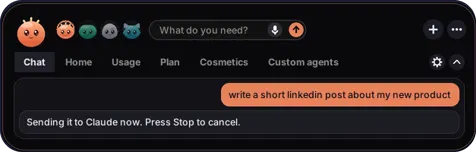
Prompty Demo
Here's the whole thing in under a minute. Most people type one short line into ChatGPT and take whatever comes back. Prompty does the part you'd skip: it adds the details, picks the right format for that AI, and asks again when the answer isn't good enough.
- Move your mouse to the top of the screen.Your agent drops down. Or press Ctrl Alt P.
- Say what you want, messy is fine."linkedin post about my new product". Type it, or speak it on Plus and Pro.
- It asks one or two questions.Only if something important is missing, like who it's for or how long it should be.
- It opens a fresh chat and sends the prompt.A purple frame shows while it's using your mouse and keyboard. Click it to stop.
- It reads the answer and pushes back.If the reply misses something, it sends a follow-up. The best answer gets a frame.
Same request. Very different prompt.
An answer is only as good as the question. Each AI also prefers a different style: Claude works well with clearly tagged sections, ChatGPT with headings and numbered steps. Prompty knows the difference so you don't have to.
write a linkedin post about my new product
<role>You write LinkedIn posts for small founders.</role>
<task>Announce Prompty, a desktop agent that writes
better prompts for Claude and ChatGPT.</task>
<audience>Founders who use AI every day but get
average answers.</audience>
<format>Under 150 words. A strong first line.
Three short paragraphs. End with one question.
No hashtags.</format>
Example for illustration. What you get back depends on the AI and on your request.
One agent for each AI
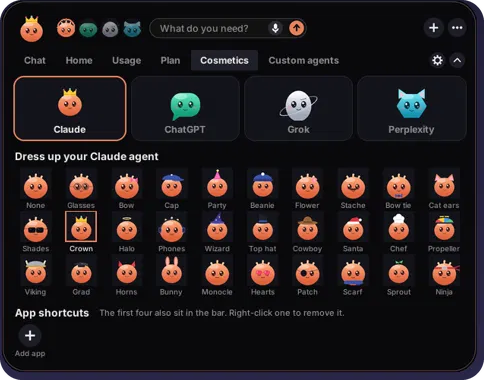
Claude, ChatGPT, Grok and Perplexity each get their own agent, and each one knows how its AI likes to be asked. Switch between them from the bar.
You can also dress them up. There are 29 hats and accessories, from a party hat to a wizard hat to a tiny sprout.

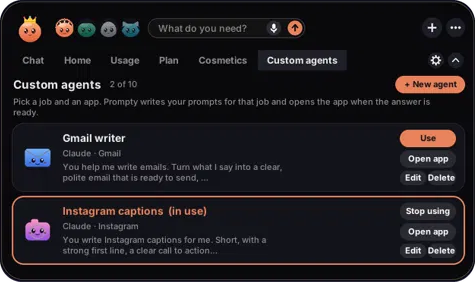
Custom agents for jobs you repeat
Pick a job and an app, like "Gmail writer" or "Instagram captions". Prompty remembers how you want that job done, writes your prompts for it, and opens the app when the answer is ready.
Custom agents open the app for you. They don't read your inbox and they don't post anything for you.
What Prompty does on your computer
Prompty uses your mouse and keyboard and reads your screen, so it's fair to ask what it actually does. Here's the plain list.
| Question | Answer |
|---|---|
| When does it use my mouse and keyboard? | Only after you send a request, to open a new chat, paste the prompt and press Enter. A purple frame is on screen the whole time. |
| What does it look at? | Screenshots of your AI app's window, only while it's working on your request, to read the answer. |
| Does it watch my screen in the background? | No. |
| Where does that go? | Through Lumly's server to Anthropic's AI, which reads the answer. Your account and usage are stored with Supabase. |
| What does it save on my PC? | Settings and history in %APPDATA%\Prompty. |
| Can I remove it? | Yes. Settings → Apps → Installed apps → Prompty → Uninstall. |
You'll probably see this warning
This shows for new apps that aren't code-signed yet, which costs money and takes time for a small company. Click More info, check that it says Prompty-Setup.exe, then click Run anyway. Code signing is on the list before launch.
Check the file yourself
This is the SHA-256 of Prompty-Setup.exe v0.46. If yours matches, it's the exact file we published.
5a45ce37f27f232294479c576a90e78ba9359f1b648b14cde31967d5c177d933In Command Prompt: certutil -hashfile Prompty-Setup.exe SHA256 · or look it up on VirusTotal


Built by one person in Tel Aviv
I started Prompty because most people don't know how to write a good prompt, and it's the difference between an average answer and a great one. The first version was a Python script running in a black Command Prompt window. Prompty has come a long way since.
Lumly is just me for now. If something breaks or you have an idea, you're writing straight to the person who builds it, and I read everything.
Jonathan, founder of Lumly
Try it on your PC
Download Prompty
Install
- Open
Prompty-Setup.exefrom your Downloads folder. - If Windows says "Windows protected your PC", click More info, then Run anyway. Why this happens.
- Sign in or create your free account in the app.
- Open Claude, ChatGPT, Grok or Perplexity, then move your mouse to the top of the screen.
Uninstall
Settings → Apps → Installed apps → Prompty → Uninstall. Your settings folder %APPDATA%\Prompty can be deleted after that.
- file
Prompty-Setup.exe- version
- 0.46
- released
- 9 October 2026
- size
- 65.9 MB
- needs
- Windows 10 or 11, and the Claude, ChatGPT, Grok or Perplexity desktop app, signed in
- account
- Free Lumly account, made in the app
- updates
- Prompty asks before updating
- sha-256
5a45ce37f27f232294479c576a90e78ba9359f1b648b14cde31967d5c177d933
On a Mac?
The Mac version is in the works. Leave your email and you'll hear when it's ready.
Pricing
Start free. Upgrade when you want more usage, voice and more languages. Plus and Pro are shown as multiples of the Free daily usage.
| Free$0forever | Plus$14.99per month | Pro$39.99per month | |
|---|---|---|---|
| Daily usage | 1× | 5× | 15× |
| Improves the answer | Once | Up to twice | Up to 5 rounds |
| All four agents | Yes | Yes | Yes |
| Custom agents | 1 | 3 | 10 |
| Voice | No | Yes | Yes |
| Languages | English | 8 | 18 |
| Accessories | Basic | More | All |
Plus languages: English, Hebrew, Spanish, French, German, Arabic, Portuguese, Russian. Pro adds Italian, Dutch, Turkish, Polish, Ukrainian, Chinese, Japanese, Korean, Hindi, Indonesian.
How to upgrade
- Download Prompty and create your free account in the app.
- In Prompty, open Plan and click Upgrade on Plus or Pro.
- Pay with PayPal or a card through PayPal. Your plan switches on within a minute.
Upgrading starts from the app so the payment goes to the right account. Prices in US dollars.
Plan questions
What happens when I hit my limit?
Why multiples and not exact numbers?
Do I need to pay for Claude or ChatGPT too?
How do I pay?
Can I cancel any time?
Can I switch from Plus to Pro?
Refunds?
What's new
Every build of Prompty, newest first. Get the latest one on the download page.
- Upgrade to Plus or Pro with PayPal, right from the Plan page. Monthly or yearly.
- Your plan switches on by itself after you pay. There's also a Refresh plan button.
- Manage or cancel your subscription from the Plan page.
- Prices now show on the plan cards.
- The bar closes on its own when your mouse leaves it.
- Checks that a new chat really opened before sending.
- The best answer gets a frame, so it's easy to find.
- Tray icon and Start with Windows.
- Clearer message when voice isn't available on a computer: it now tells you to update Prompty or contact us, instead of showing a technical command.
Help
Common questions
Is Prompty safe to install?
What can it see on my screen?
Why does it control my mouse and keyboard?
Why a new chat every time?
How do I uninstall it?
Something not working?
"Prompty couldn't open a new chat"
- Use the desktop app, not the website in a browser.
- Close any pop-up or settings screen inside the AI app.
- Don't move the mouse while the purple frame is showing.
It can't find my AI app
- Pick the agent that matches the open app, for example ChatGPT for the ChatGPT app.
- Restore the app if it's minimised.
The agent doesn't show up at the top
- Check for the Prompty icon in the tray, next to the clock.
- Move the mouse slowly to the very top, near the middle. Or press Ctrl Alt P.
It read the answer wrong
- Make the AI app's window bigger so the whole answer fits.
- Very long answers can get cut off. Ask for a shorter one.
Contact and bug reports
Email the address below. For a bug, include your Prompty version (Settings), which agent you used, what you asked for and what happened. A screenshot helps a lot.
lumlysupport@gmail.comPrivacy policy
Last updated 9 October 2026
Who we are
Prompty is made by Lumly, Tel Aviv, Israel. Contact: lumlysupport@gmail.com. Company details: [LEGAL NAME, REGISTRATION NUMBER].
What we collect
- Account: your email and sign-in details, stored with Supabase.
- Usage: how much you use Prompty, counted per account so plan limits work.
- Requests: what you type or say to Prompty, so it can write your prompt.
- Screenshots of your AI app window: taken only while Prompty is working on your request, so it can read the answer.
- Launch and Mac waitlist emails: if you sign up on this website, we keep your email only to tell you when Prompty launches or when the Mac version is ready. Reply to any of those emails to be removed.
How it's used
Requests and screenshots go through our server to Anthropic's AI, which writes the prompt and reads the answer. They're used only to complete your request. [HOW LONG THEY ARE KEPT, IF AT ALL].
What's saved on your PC
Settings and history are saved in %APPDATA%\Prompty on your computer.
What we don't do
- We don't sell your data.
- Prompty doesn't watch your screen in the background.
Services we use
- Supabase: accounts and usage.
- Anthropic: the AI that writes prompts and reads answers.
- Our file host: stores the download files.
- Netlify: hosts this website and stores waitlist sign-ups.
- PayPal: payments, once they open.
Cookies and analytics
This website doesn't use cookies or analytics right now.
Deleting your data
Email lumlysupport@gmail.com from your account's address and we'll delete your account and usage data.
Terms of service
Last updated 9 October 2026
Using Prompty
You need a Lumly account. You're responsible for what you ask Prompty to do and for following the rules of the AI apps you use with it.
What Prompty does
Prompty writes prompts and operates your AI app on your computer when you ask it to. AI answers can be wrong, so check anything important.
Not affiliated
Prompty is an independent product by Lumly. It isn't made, endorsed or sponsored by Anthropic, OpenAI, xAI or Perplexity. Claude, ChatGPT, Grok and Perplexity are trademarks of their owners.
Plans and payments
Plus ($14.99 a month or $149.90 a year) and Pro ($39.99 a month or $399.90 a year) are billed in US dollars through PayPal and renew automatically until you cancel. You can cancel any time in your PayPal automatic payments; your plan stays active until the end of the period you paid for. [HOW YOU'LL ANNOUNCE PRICE CHANGES]
Liability and governing law
[LIMITS OF LIABILITY · GOVERNING LAW]
Refund policy
Plus and Pro are paid through PayPal, monthly or yearly. The Free plan costs nothing.
After launch
If you ask within 7 days of your first payment for Plus or Pro, you get a full refund. Renewal payments aren't refunded, but you can cancel any time and keep your plan until the end of the period you paid for. To ask for a refund, email lumlysupport@gmail.com from your account's address.